Dev Blog – Episode 5: Highlights
The fifth installment of the First Look series provides an overview of many improvements and features that have been implemented for Transport Fever 3 over the past few months.
The development team at Urban Games is working tirelessly towards the release of Transport Fever 3. Feedback from the community and multiple rounds of beta testing have provided valuable insights that are now being incorporated into the ongoing improvement of the game. Alongside models, atmosphere, and other visual elements, there is also a clear focus on easy-to-understand gameplay mechanics, an intuitive user interface, and balancing the new mechanics.
Easier, more intuitive and faster
To make the game easy to understand and enjoyable to use for everyone, an intuitive and self-explanatory user interface is essential. In Transport Fever 3, great importance is therefore placed on making the relationships and challenges within the game world easy to understand, presenting them in a clear and accessible way. To achieve this, existing concepts were revisited and improved in the areas where players had experienced the greatest difficulties.
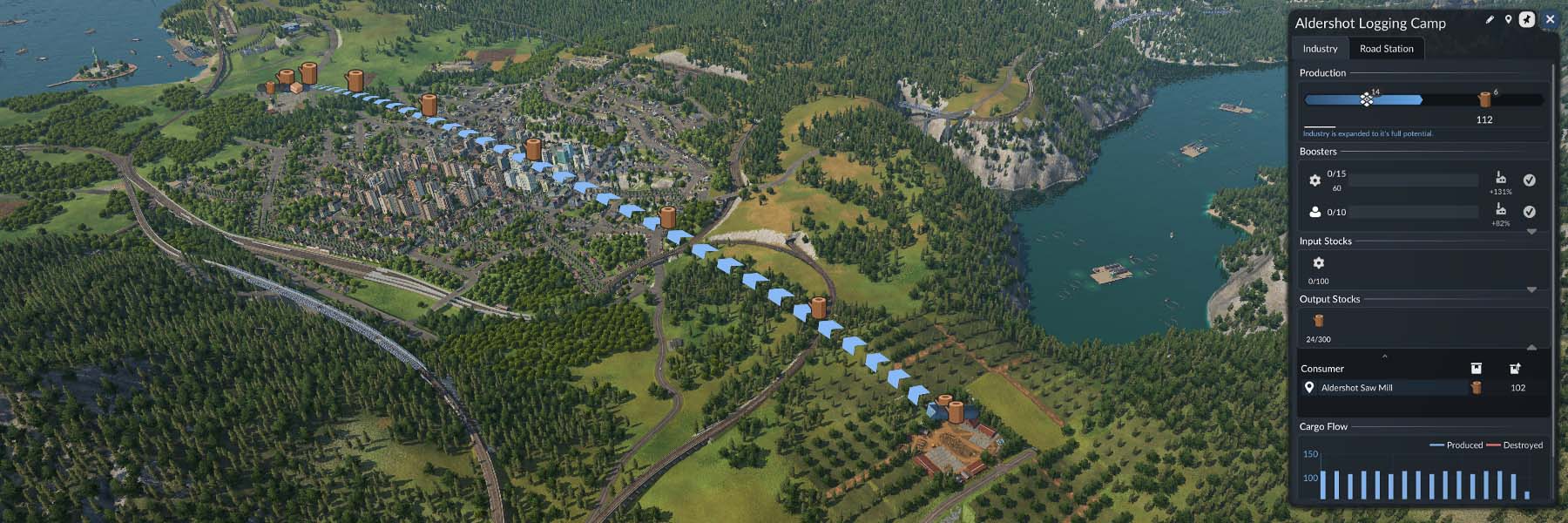
Many areas of the user interface now include new quality-of-life features that make everyday tasks in the game easier. Depending on the selected object or context, for example, different information icons are displayed directly in the game world, allowing players to grasp the most important information at a glance. Information such as the flow of goods is now visualized in the world using an overlay. Similarly, when residents become unhappy, such as because of excessively long waiting times at a station, a sad smiley appears and floats upwards at the relevant location.
Improvements have, of course, also made their way into the Line Manager, the game’s central control hub. To avoid forcing players to constantly switch back and forth between windows and the game world, lines, stations, and vehicles can now be selected and edited directly in the game world. In addition to placing waypoints, this also includes adjusting and moving stops. The management window itself has also been completely redesigned and expanded with many useful features. For a clearer overview, lines can be named automatically according to different naming patterns. When assigning vehicles to lines, various distribution options provide greater control over where the vehicles begin their pathfinding. Even the order of stops can now be adjusted intuitively after the fact by dragging and dropping them within the list.
The vehicle purchase menu has also been completely overhauled. In Transport Fever 3, attributes such as loading speed, comfort, noise, and pollution play an important role alongside the established technical specifications of each vehicle. A comparison mode has therefore been built directly into the menu, making it easier to understand the differences between vehicles and select the best option. After all, the latest model is not always the best choice. Each vehicle has its own individual mix of advantages and disadvantages, ensuring that proven models from earlier years remain relevant.
All clear
More vehicles mean more traffic. This applies not only to roads, but also to the rail network. In addition to the previously announced option for prioritizing railway lines at junctions, further improvements have been made to train pathfinding, allowing even more efficient rail networks to be created.
In Transport Fever 2, for example, trains only ever reserve a route as far as the second-next signal or the next stop. This can lead to deadlocks when trains enter a single-track section with more than one stop from opposite directions. To prevent this, the reservation logic has been improved for Transport Fever 3. Trains now reserve their route beyond the next stop, up to a stop where they can change direction, or up to the next signal along the way. This means that all previous configurations remain possible, while also enabling many new layouts that did not work before. Since signals are now consistently required wherever trains are intended to pass each other, their behavior is much easier to understand intuitively, especially for newcomers.
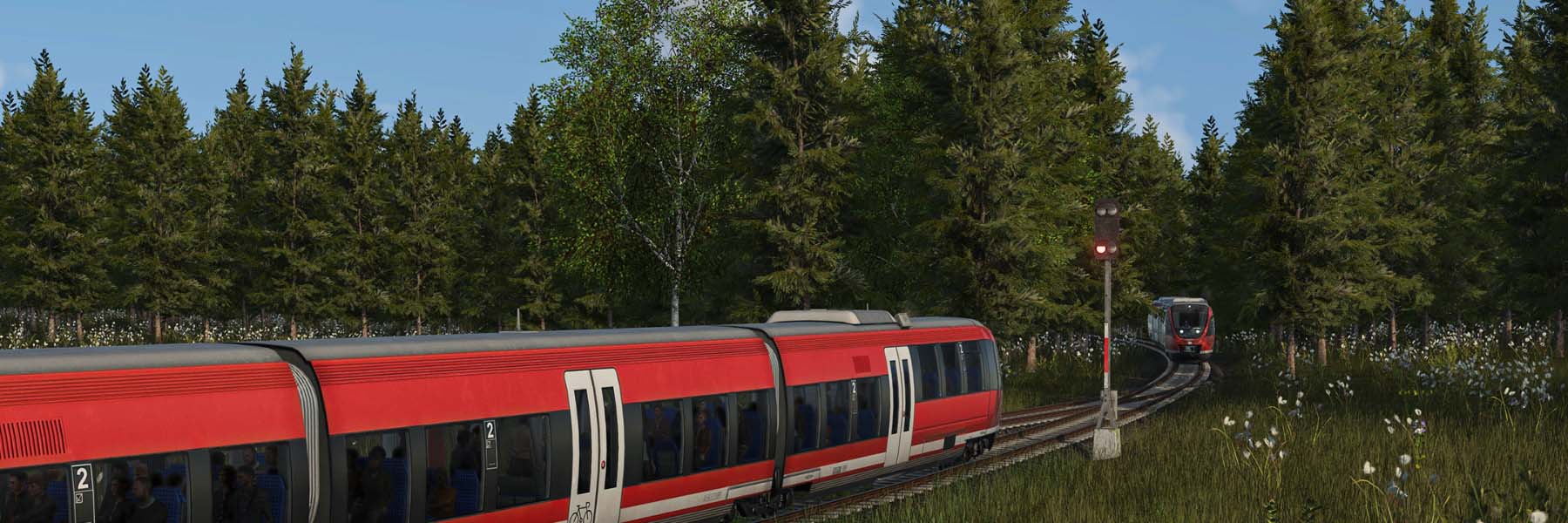
For the more technically minded readers: signals in Transport Fever 3 use path-based signaling, just as they did in the previous games. Unlike block signals, trains do not interfere with one another when traveling on tracks that are not part of their intended routes. A signal simply turns green when an approaching train is able to reserve its specific route up to the next signal. To prevent long queues from forming outside stations, trains can consider configured alternative terminals if they are unable to reserve a route to their primary terminal, for example, because it is still occupied by another train.
Under the hood, there are also some interesting new features for modders. Not only signals, but also roadside bus stops are now implemented as full-fledged constructions. This means they can support parameters and can even be assembled from multiple models. As a result, different variations, sizes, and special designs can now be created in a single construction step. Context information is also available, allowing signals and stations to automatically adapt their appearance depending on whether they are placed on a bridge or inside a tunnel.
A Storm Is Brewing
In Transport Fever 3, the soundscape also responds dynamically to external influences from the surrounding scenery and the player’s activities. To ensure that the ambient audio matches the visual elements around the camera, the area surrounding it is continuously scanned for relevant objects and categorized accordingly. These include buildings with their various land uses and levels, different modes of transport, people, as well as the map’s flora and fauna. In addition to their individual sounds, suitable ambient background audio is then played spatially around the camera.
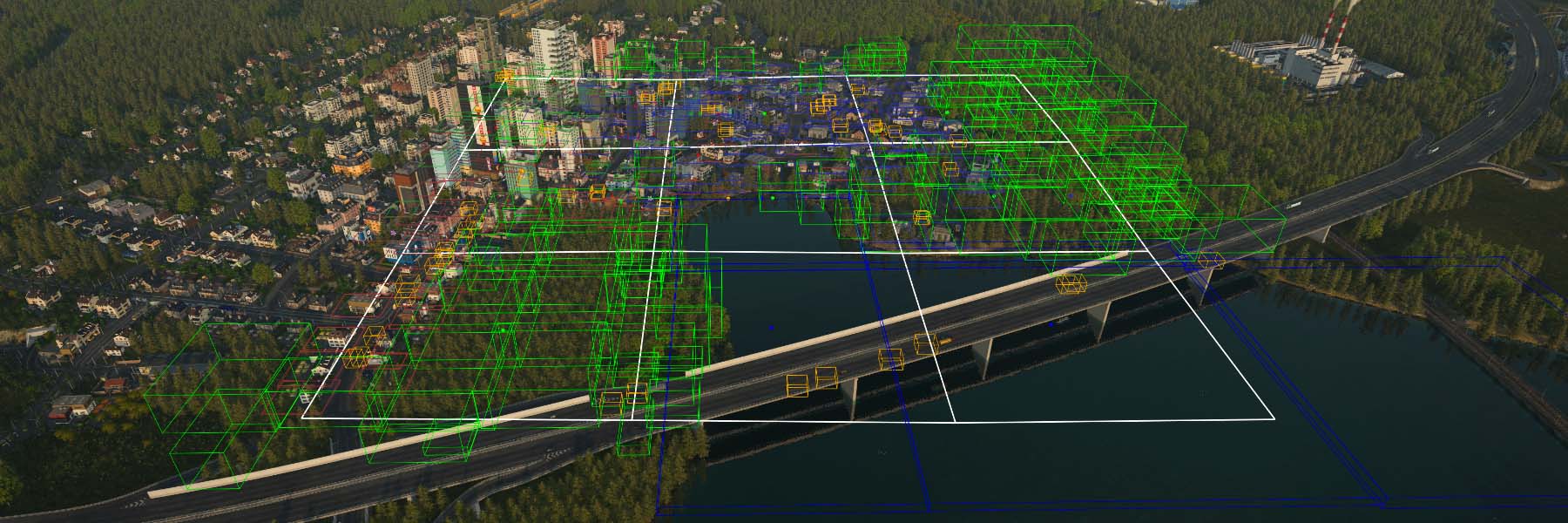
It therefore makes a significant difference whether the camera is currently located in an ocean biome or in a river valley between towering mountains. The weather and time of day also affect the soundscape. Not only does rain change the sounds of the environment, but it also influences which animals can be heard, as some only become active at night while others seek shelter from the rain. Listen closely and you may hear frogs croaking in the marsh or a woodpecker tapping away in the forest, as long as the sun has not yet set. Once night falls or rain begins, the animals gradually fall silent.
This can happen, for example, when dynamic weather changes are enabled, causing the conditions to alternate between sunshine, cloudy skies, and rain. The darker the clouds overhead, the more beams of light become visible in cities and along the roads. Players who find this too gloomy can instead set their preferred weather conditions permanently.
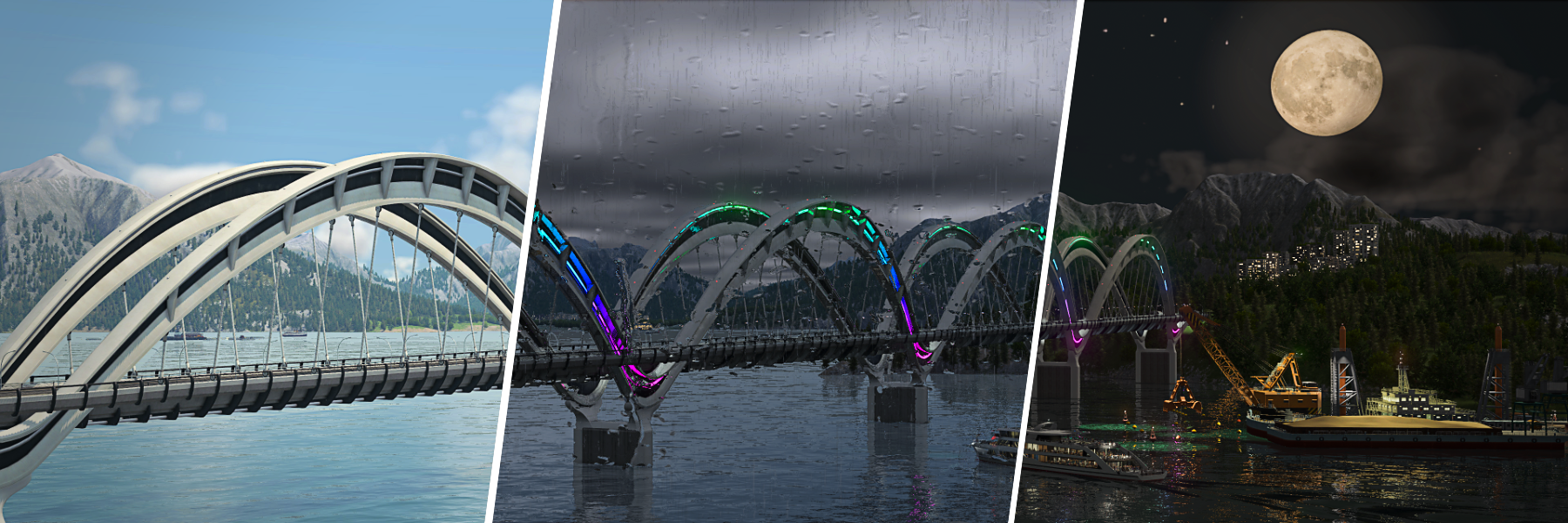
The player also has full control over the time of day, allowing the lighting and atmosphere to be adjusted to suit their preferences. The time of day can be synchronized with real time, or a cycled mode can be selected in which the time changes regularly, presenting the game world in a new light again and again. Those who prefer to view the world by moonlight or beneath the intense midday sun can, of course, simply choose a fixed time of day.
Mod-Management made easy
A major focus for Transport Fever 3 has been to expand modding, making it both deeper and easier than ever.
Alongside numerous gameplay mechanics, including time of day and weather the game’s content can also be customized thanks to the constantly expanding range of modding capabilities. Many of the new features, almost the entire user interface, and numerous familiar functions have been designed using editable scripts in Transport Fever 3. This approach provides far greater flexibility for modding, allowing entirely new and game-changing mods to be developed. Whether that’s new game modes, interface upgrades, additional functionality, or changes to fundamental aspects of the game, we have put significant effort into making modding as accessible and expansive as possible.
All mods now use a fixed, unique mod ID. This will drastically reduce problems with mods in shared save games regardless of whether they have come from different sources or how they were installed as it allows every mod to be identified unambiguously. This also greatly simplifies the handling of dependencies – where one mod requires another in order to work – as any missing mods are automatically detected and listed directly during download. This way, errors caused by forgotten mods can to not only be reduced, but in many cases completely avoided.
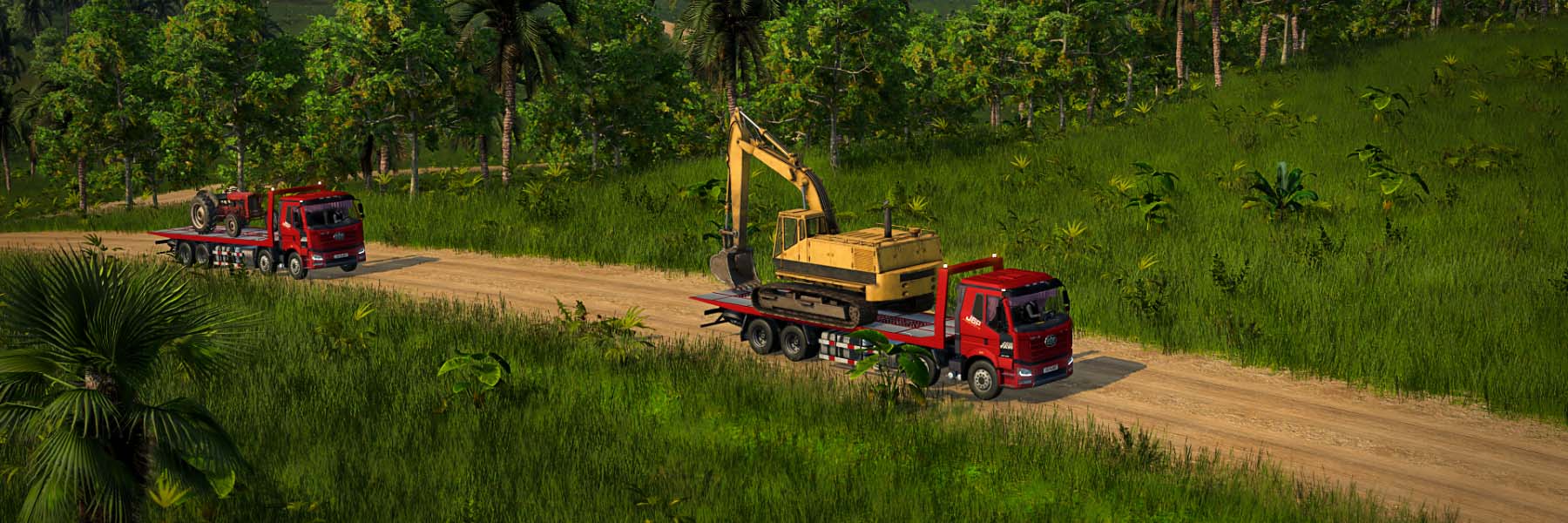
It is important to us that all players, whether on PC, macOS, Linux, or console, have fast access to all mods and are able to share their own content across platforms with ease. For this purpose, the Mod Hub can be accessed directly from the main menu, where players can browse, subscribe to, and automatically download the latest mods and updates. Mod.io also allows you to adjust your mod collection via web browser giving you the ability to expand or manage your mods no matter where you are.
This is made possible through the use of mod.io as our partner solution, which has already proved itself for cross-platform mod-sharing for Transport Fever 2. In the past there have been restrictions over what could be shared through our mod browser, and these limitations have been significantly reduced. For Transport Fever 3 the use of brand logos will no longer restrict mods being added to the Mod Hub on consoles, due to new agreements with Sony and Microsoft, bringing it into alignment with all other mod-sharing options. The storage requirements of mods, and therefore their suitability for consoles, are also now adapted to each platform. When a mod is uploaded, an optimized console version is generated automatically. This allows modders to make their creations available to players on every platform without any additional effort.
In the past we have also offered the Steam Workshop as an option. The issue with the Workshop has been that any player who is not on Steam – including PC players who have used an alternative store – has not had access to Workshop mods. This has created a fractured mod collection for the game, where the options you have to expand your game has been dictated by the platform you are playing on. We want to eliminate this fracturing if possible. We are, therefore, considering whether or not to offer the Steam Workshop as an option in the new game. Since many Steam players are highly familiar with the Workshop as their modding platform, we are working to ensure that the Mod Hub offers the same, if not better experience and range of features for both modders and players before making a final decision on which mod sharing options we include.
As much as no player is excited about needing to do things differently in a new game, our aim is to make modding a universal experience. The same options being available no matter where you play. The mods you have on your PC being the same as your PlayStation 5, or your Macbook – allowing you to continue your game no matter which platform you have available. That said, we will not make a final decision on the inclusion of the Steam Workshop until we have reached the level of functionality Steam players have come to expect.
Regardless of other options, manual mod installation will remain an option, allowing communities to continue distributing their mods and saves independently for PC and Mac.
Extended Modding-Tools
Alongside the game itself, the modding tools are also being continuously developed and improved with the help of feedback from the Curated Mods program. Some highlights include:
- Constructions, decorations and ground textures can be arranged and exported directly within the game. This intuitive solution significantly reduces the amount of scripting required in many cases.
- Most script-based game content can be reloaded while the game is running, allowing changes to be tested directly without having to reload the save game. This greatly reduces the time required for iteration.
- New analysis tools make it easier to troubleshoot issues and inspect simulation and rendering data directly while the game is running.
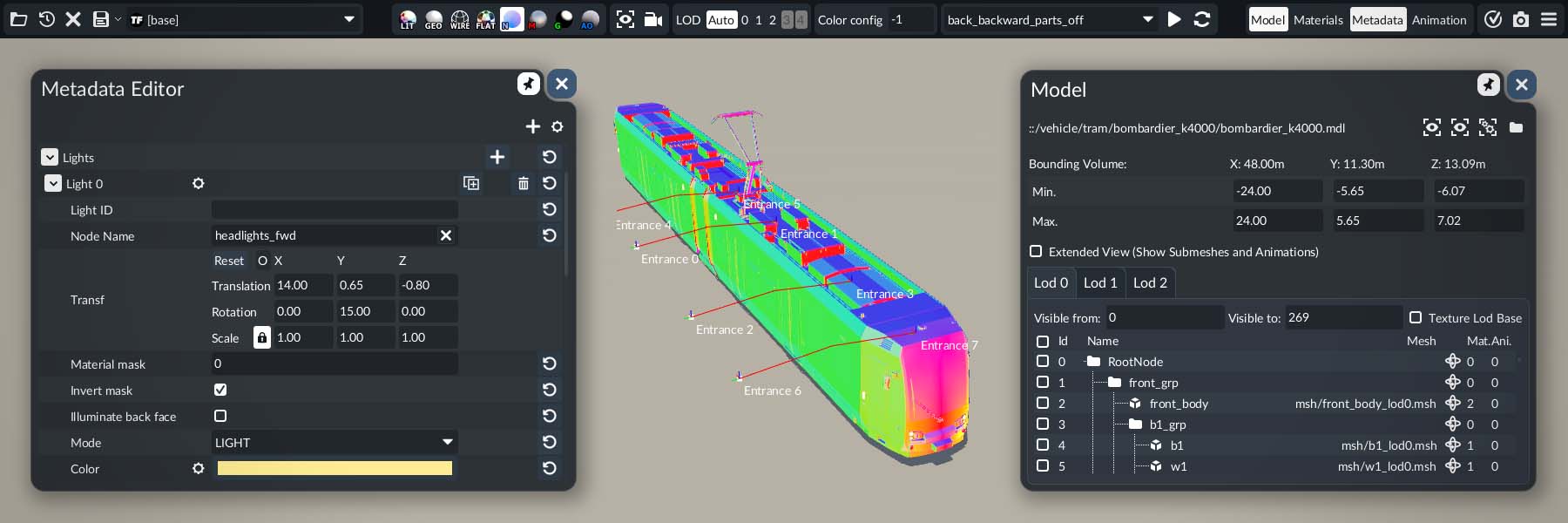
The tried-and-tested Model Editor is also receiving a major overhaul for Transport Fever 3, adding many new quality-of-life features that make working with it easier. In addition to integrating new model features such as light cones and vehicle entrances, particular attention has been paid to improving support for importing models from Blender. Basic conversion of existing Transport Fever 2 models is supported as well, allowing them to be integrated into Transport Fever 3 with just a few adjustments.
To make all the new features, tools, and further information about the modding interface accessible to everyone, an updated version of the Modding Wiki will also be released alongside the game. In addition to documentation and examples, it will contain plenty of tips and tricks to help newcomers familiarize themselves with the subject more quickly.
The Journey Continues
At Urban Games, the team is working around the clock towards the release of Transport Fever 3. Until then, the game will continue to be steadily improved, with further refinements to the user interface, balancing, simulation, and performance. We can’t wait to see what players and modders will create with it.
Matthias Gürtler
Lead Product Engineer

95 Responses
Hi i have 2 questions will the Re 6/6 make a comeback in the game series and will polish be supported when it comes to towns, bus station names and people?
cuando sale el juego en steam Habra una beta que se pueda probar gratuitamente
The game is still on course to release in 2026.
If you signed up for beta testing last year you may still be considered for the beta program, however we received many times more applicants than we can support so we cannot make any guarantees.
In TpF2, new users often had trouble getting the model editor to work correctly.
If at all possible, please ensure that the Model Editor will just work, right out of the box, rather than requiring a configuration routine.
If you can’t get away from that, it would probably be a good idea to use O/S dialogs for the configuration routine, rather than command line entries.
We want the tools to be as accessible as possible and are making an effort to help where possible, but some level of learning is to be expected. That said, if a user has managed to work through the learning curve to make a new model, the next steps to make it game ready really shouldn’t prove too much of a challenge.
So, why don’t residents hold umbrellas on rainy days?
they like the free shower
Looks to me when it rains it’s only on the camera lens and not the ground
The ground does not get even wet
Does it matter? All games dont need to be as if you are in the MATRIX!
verry good news, game still looks promissing.
sadly nothing in here for me to write 20 comments, 40 paragraphs long here,
im sorry to dissapoint…
much love,
enderlais
ダイヤグラムは機能しますか?
昼夜の区別があるのだから当然朝と夕には需要が多く、日中はまぁまぁ、早朝と深夜は需要が少ないようにできますか?
貨物は朝と夕の需要の多い時間には走らせないように、また役割を終えた車両はそれ以外の時間では車庫に止めておけますか?
The game does not include timetables since the day and night options are a cosmetic choice rather than representing any change in the demand of towns. That said, changing priorities to force freight trains to give priority to passenger or express services is part of the new game, even if the schedule on which those trains operate isn’t affected.
Hi. There is a timetable mod in TpF2, which is ok, but it’s very basic. You only have a 1 hour timeslot to put in set times for trains to depart. If TpF3 is going to have a day and night cycle, then this won’t suffice, especially if the new game is going to have real citizen daily life behavior where they wake up in the morning, go to work/school during the day and then go to sleep at night. I would need to have different times and frequencies per line, where there would be less vehicles per hour for a certain period during the night time eg. from 10pm to 6am I would drop the frequency right down to not waste money and maintenance, especially if there’s going o be a drop in passenger demand. Basically I want to assign different frequencies and departure times for different times of the day, including a rush hour if that’s going to be implemented in the game. Then obviously you would need somewhere where the vehicles that aren’t needed during the night to be stored until they’re needed again the next day.
I at least want a more detailed and immersive timetable system than the modded one in TpF2.
Is this something the team has thought about?
The addition of timetables was considered during development, but it’s not a feature that we felt was in-keeping game experience we wanted to design. The day and night cycle was a feature that was heavily requested by players after the last game, so was added as a cosmetic option so you can view your created network at any time of day.
Use the users local time?? I would use this to take the train that is far away to replace it 😀
“ Trains now reserve their route beyond the next stop, up to a stop where they can change direction, *or up to the next signal along the way*.”
Does this mean, that if there is a block post midway between two multi-track stations on a single track line (which is a scenario on many real-life lines), it is still possible for two trains running in opposite directions to deadlock face-to-face at the block post, like in TF 2? I really hope not, because that severely limits throughput on single-track lines, when you can’t have two trains running in the same direction at the same time, but in different blocks, on single-track lines.
As much as the longer look-ahead will help with single track running, it will ultimately come down to how many signal you’re choosing to use on those routes. The scenario of running multiple trains on single track can work, but even with increased look-ahead it won’t stop trains deadlocking if your signalling permits it.
What plans are there to reduce vehicle stuttering as a game progresses in TpF3 as it has been an issue in TpF2?
The performance of the late-game is something we’re spending considerable time on. The issue is that once you reach more individual citizens in the world than your system can keep up with you will get some performance drop-off. At what stage this happens depends on the hardware you’re using and the scale of the map. While we’re hoping that maximum performance will continue through larger populations, you will reach a point where your speed starts to dip since we do not prevent players from growing beyond the capability of their hardware.
Hello Sam,
My hardware had a capability 4 times more than the game required two years before the release of TpF2. It was the engine which couldn’t utuilize modern hardware then and now. Ok, I’m working on my computer, too, so my config is above the average (and not even 32+ threads CPU). But it was painful to see a simulation game utilizing much less than a half of the resources. We hope for more multithread-utilization-capable engine in 2026 than it was in 2019.
Hello,i have a question/proposition. Will the tram system (tracks,stops etc.) have its own category like trains or ships.It would be nice if someone wanted to make tram track parallel to the road.
Best Regards.
Hi I Want 2 Know If The Map Is Going 2 Be Real Big Because On Transport Fever 2 The Map Was Not Real Big On Transport Fever 2 And Plus The Map Was Not Real Big For The Freighter Trains And Plus You Could Not Have The Platform Like Real Far Away From Each Other Because You Had 2 Have The Platform Near 2 Each Other Then You Could Not Have Lots Off Platform Because You Could Only Have About 9 So I Am Hopping The Map’s Are Not The Same Size On Transport Fever 3 Then They Are On Transport Fever 2 And The Map”s Are Real Big So You Have Lots More Things 2 Do On Transport Fever 3 Then You Could Do On Transport Fever 2
We are experimenting with map sizes ahead of the release of the game, but it is worth keeping in mind that the scales used in the game are not intended to be realistic. Instead it aims to create a similar feel to reality even if distances and scales are shortened over what you’d expect in reality. That the game can sometimes feel near-realistic is fantastic but our aim has always been to create a fun game experience, more than a truly authentic environment.
Hello developers,
I have a question and a feature request regarding Transport Fever 3.
Will it be possible to build curved railway stations (stations on curved tracks) in the base game? This would make railway construction much more realistic and flexible, as many real-world stations are not located on perfectly straight tracks.
If this feature is not currently planned, I would really appreciate it if you could consider adding it. I believe it would be a valuable addition that many players would enjoy.
Thank you for your time, and I look forward to hearing your thoughts
This is very much something i would want, too! How did we go from TF1 with curved stations, to silly little straight blocks in TF2. I really hope this has been looked at.
As a player, not a modder, I would rather have ALL mods a mod.io and step away from the Steam Workshop. It has been difficult to keep large mod collection organized and up-to-date when spread out over various services.
Steam Workshop is way more organized, has better sorting options and doesn’t bug out when you try to remove a mod, I have no idea why would you prefer mod.io over sw tbh. It’s simply superior
I’m even more excited now. Espacially the improvment for single track lines will help me so much for building rural rail lines.
I also think the addition of mod.ids is a very clever move.
I do have one question regarding signal aspects. If i understand correctly, the signals will only know 2 states, free and blocked. So am I right in assuming that, even with mods, it will not be possible to have signals that shows diffrent aspects depending on the train’s route behind the signal?
Either way, I am already looking forward to getting into the game.
Yes, I’m also very curious to know whether railway signals will show a steady yellow light, or perhaps a flashing one.
Hello!
Now that emissions play a much bigger role. How could we get around placing stations closer to the centre? For example, will underground stations have less emissions?
To what extent does the game take advantage of multi-core CPUs to boost performance, given that in previous versions the game was essentially slowed down by its predominantly single-core usage?
And is a powerful GPU like the RTX 5080/5090 necessary for the smoothest possible performance?
The game does take advantage of multi-core CPUs, however one core always acts as the governor over the others in order to preserve proper synchronisation. This function cannot be spread over multiple cores because it simply wouldn’t work. Obviously, our aim is to load balance as much as possible but there’s no getting away from the need to constrain governance. General improvements to the way the game is optimised should be noticeable, even though the game is more advanced than previous entries in the series.
For the smoothest possible performance, the better the hardware you are using the better it will be. We will post both the recommended and minimum specs required when the game is closer to launch.
Will single core be more important or multi core this time? Last tame it was verry single core heavy.
The revamped sound design is extremely welcome. I just wish the camera doesn’t need to be so close to hear those sounds. In TpF2, you can hear industry and forest, but the camera must be way too close. From a distance, you hear nothing, and most of the time I’m not too zoomed in.
Gibt es zur Peformence eigentlich irgendwann ein Einblick zu den Konsolen Systemen ? Es wird zwar oft über Peformence auf den PC Plattformen geredet, aber nicht wirklich über die PS5/Xbox. Es wäre schön ein Feedback zu erhalten. Aber ich freue mich riesig auf den release 😁
Die Optimierung auf allen Plattformen gehört derzeit zu unseren wichtigsten Entwicklungsaufgaben. Verbesserungen an der Art und Weise, wie Berechnungen auf einer Plattform verarbeitet werden, kommen grundsätzlich auch allen anderen Plattformen zugute. Konsolen sind in dieser Hinsicht etwas einfacher zu optimieren, da ihre Hardwarekonfiguration fest vorgegeben ist. Dadurch lässt sich leichter ein Ansatz finden, der die bestmögliche Leistung erzielt.
Insgesamt wird sich die Leistung bei großen Spielständen verbessern. Wie deutlich diese Verbesserungen ausfallen werden, hängt jedoch davon ab, welche Fortschritte wir im Rahmen unserer Optimierungsarbeiten erreichen.
Hello! I was wondering if you guys could let us know more about the railway system, what’re we able to build, how, etc. For example, when building a station, would we have the possibility to modify a station and save it to use it as a template? Or is it going to be the actual system that means every single station we place, we’ll need to modify it from scratch? This option would be good for similar stations on networks such as underground or suburban railways.
Continuing with railways… How are the switches gonna work? Are we gonna have finally blades? Yes? No? Are they going to be animated? Possibility to change distance from trains to signal via signal menu? Are the trains still gonna roll in the platforms if signal is red?
Would also like to know this, if stations can be blueprinted/copied so we can reuse something we design once that we like over again. Thanks
Will we finally have a nice map/minimap for quick navigation and quick glance at the network, cities, industries?
Hey, one question regarding late-game performance;
In a Schönbau-Scenario in TF2, performance often is NOT limited by the number of citizens (as these are controlled with mods at a low level).
It is limited by the many many different textures and objects. In a detailled city for example, stuttering gets much worse then. Even with a top tier GPU and 20 GB of VRAM this still poses a major problem.
Is this adressed too in TF3?
Thank you.
Much like anything else in the game there is a point you can reach where there is simply too much for your system to be able to handle. In the case of mods, adding hundreds of different textures, models, and other graphics-requiring elements will obviously put a greater strain on system. To that end it doesn’t matter how much work we put in on optimisation, and we’re doing a lot, players will be able to go further than their hardware can handle. The only solution to this would be to implement a limit on how many mods players could run at once, and that wouldn’t be a popular choice, so we have always opted to let you decide for yourself when you have reached “too much”.
Thank you very much for the reply. Clearly there will always be a ceiling. And I have to say: It is impressive game design even in TF 2. I mean which game can handle 500+ (or more) mods of different sources at once without crumbling?
Just wanted to know if you have these things in mind for optimizations in TF 3 so that it further improves. Just as you do with CPU related topics like citizen calculation.
Ich bin seit 25 Jahren Modder und mußte bei den Anfängen des Moddings explizit auf die Hardware Rücksicht nehmen. Heute achten die meisten Modder nicht auf das optimieren von Texturen. Ich habe das immer wieder beobachtet. Auch ist es oft eine Detailverliebtheit, die dem Spiel nichts nützen aber die Performance beeinträchtigen. Wenn man in dieser Hinsicht mal ein paar Hinweise an die Modder geben würde, wäre das sicher hilfreich. Es fehlen , so finde ich, auch ein paar Tutorials für diese Thematik 🙂
Uns ist durchaus bewusst, dass zusätzliche Hinweise zur Optimierung für Modder hilfreich wären. Wir hoffen, solche Informationen im Laufe der Zeit in das Modding-Handbuch aufnehmen zu können.
Hey,
I am playing transport fever 2 on GeForceNow atm. On GeForceNow mods only work when subscribed on the steamworkshop, as far as I know. Mod subscribed via mod.io don’t appear in-game. Are you working on making mod.io mods available via GwForceNow in TpF3? Id really appreciate it 💕
We’ve just conducted a test at the studio and you should be able to use the Transport Fever 2 Mod Browser using GeForceNow without issue. Mods subscribed to from both Mod.io and Steam Workshop can be selected without issue. The limitation is one you are likely already familiar with: since your cloud gaming service doesn’t include per-user/per-game storage, you will need to download your mod selection when you load the game each time. Everything indicates that you should be able to use the Mod Browser without issue however.
Es wäre schön wenn man im Fahrzeug- oder Baumenü auch noch Informationen zum Mod angezeigt bekommen würde – Name des Modders und die Version würden schon reichen. Dies würde den Spielern die Möglichkeit geben verschiedene Mods untereinander besser vergleichen zu können.
Hi, how will the label system work in the game, and will there be any improvements to it?, Now TF2 in the model editor and in the metadata you can set only a few tags. And for the Czech info system it is not very useful.
Wird der Hammer! 🙂 Cool wäre es, wenn in den Industrien auch Arbeiter bei der Arbeit zu sehen sind. Dies würde das immersive Erlebnis weiter vertiefen.
Danke sowieso und Gruss aus Luzern
The new modding tools look very cool! Is it now possible to use different traffic light models in one save game? Kind of like how you can select railroad crossing gates in TPF2. Thanks for the update!
What about curved stations? Is that planned?
There are no plans for curved stations for the launch of the game. They are likely to appear later in modded fashion, but it’s not something we are including by default.
Hello! May I ask about airport runways lenght? In Tpf2 it is a bit of a flop that an airplane takes off in a few tens of meters. And also larger gaps between taxiways, runways and parking, so wings of planes don’t colide? I know it is not suposed to recreate a real life airport size, otherwise one airport took the whole map. 🙂 thank you.
You’ve identified the limitation we work to quite clearly in your question. Our airports are, for the sake of gameplay, significantly smaller than they would be in reality because the game operates on an abstract level in order to be playable. The airport models in the new game are all new, but they use a similar scale to previous games in order to align with the scale of the game. Modding is obviously a possibility after release, but we can only really speak about what’s included from launch.
Has the issue been addressed where if there’s multiple vehicles with different sounds the game will only be be able to play sounds from a few and others are silent?
This depends on the number of sound sources being played at once as no matter what you play on there’s always a limit. In most cases, you shouldn’t be aware that some sounds aren’t playing every time they should, but that isn’t to say it won’t happen – particularly if using modded vehicles where the sounds don’t always conform to the same systems the core game uses. Our aim is that you should always feel like every sound is being played, and if there are problems with this it will be investigated.
Will passengers have more consideration when it comes to choosing which transport method to take because, in Tpf1, next to car ownership, they also prefer whether the transport was cheap or fast. This allows players to set up alternatives to the train route with a ferry or bus service that takes the same path. I know that this was removed in TPF 2, but I don’t know why. Also, thank you for adding the sounds to each environment; that is an attention to detail that is nice to have. Keep up the good work. On the timetable and curve station, please at least leave breadcrumbs for Moders to pick up what you may leave behind.
The answer for changes to passenger preference is processing. With every citizen on the map making a choice of how to travel it can put a lot of strain on processing. We’ve improved our methodology in handling these calculations, and there is some variance in the decision making process to give a more organic feel to how routes or methods of transport are chosen. We’ve no doubt that after players have become accustomed to the new game they will work out which approaches are more or less effective in gaining passenger traffic.
Hello to the development team. I’d like to ask: will you be attending Gamescom 2026?
OK, I have upgraded my PC to 5060Ti, you can release the game now 🙂
Thanks for the update! Really nice things there.
Oh and… “lines can be named automatically according to different naming patterns.”… Hats off to you! Love that
I think I remember reading something about steam workshop for TF3 on consoles
I don’t know if that is possible but who knows what can happen it would be good as I’d love more uk Mods like Trains/Props/Etc
It’d be cool to see but probably very hard to do
Not to just be grammar police, but out of a genuine desire for good localization, the cargo flow screenshot has a line of text in the window for ‘Aldershot Logging Camp’ saying “Industry is expanded to it’s full potential.” In this case “it’s” is the wrong form of ‘its’. “It’s” is the contraction for “it is”/”it has”, so this line of text is saying “Industry is expanded to it is full potential.” which doesn’t make sense, ‘full potential’ is an abstract concept, an industry cannot become ‘full potential’.
“Its” should be used here, as the non-apostrophe version of ‘its’ refers to possession of something, rather than a shorthand of a compound phrase. Ie: The industry has ‘gained possession’ of ‘full potential’: “Industry is expanded to its full potential.”
English is (not) fun, I am so sorry everyone has to deal with this nonsense language.
Good catch. Localisation is ongoing and items like this should be caught without issue.
I wonder if the subway will be implemented in the game? (underground stations, underground pedestrian crossings, various subway trains, and so on)
Very impressive. Urban games matured into formidable developer.
I am very glad you spend time on iterating UI, it is usual pain or any simulation game. I want to highlight the known issue “white screen of pain” which still exists in your videos.
While you trying to solve access mods , you probably produced a monstrous headache. My two cents : Althou people are used to steam workshop, we can get used to a new internal-cross-platform-mod-manager as long as it is similar. Similar regarding visuals AND functions AND reliability.
What ever you choose, here is the most important think to consider : ” never bite a chunk you cant swallow “
Thank you for your input Georg and rest assured that the team takes onboard and appreciates all kind opinions and inputs when making big decisions.
Wird es diesmal reine Fußwege geben?
Olá, tudo bem?!
Gostaria de saber se haverá carros como demanda nas cidades. Transportaremos veículos em caminhões cegonha ou algo assim?
While there is no official list with all available types of cargo at this point, if you watch the last First Look video carefully, you might spot some very interesting cargo types.
Will they be available only in free game? In TF2 only very limited cargo types are available.
Sooo… About the trains. Are the pathfinding is now better, logical and intelligent? Like finding all available ALTERNATIVE routes to next station, when main route is jammed. I mean, if i have station with 2 platforms, 2 tracks and each at start and end of station have scissors crossover (train approaching left can go to right platform and then continue it’s jurney after station on left track), if, like, there 2 trains approaching from 1 side on right track, 1 is stopping at this station and another is not, can the second train overtake first train on left track trasspassing while first is loading at station? I mean, not just waiting when that will end load and be after it, and in bigger proportions where there is like busy station with 10 platforms and 13 track, like to takeover trains that are waiting its turn on other tracks or loading, not in need to build additional tracks for each line because of train jams of their stupidity (like in tf2 there is a free track but train is just waiting when his path line will be free and not seeking for ALTERNATIVE way to its next station/waypoint).
Aaand… About train priority, like, can heavy train that goes 80kmh wait for 1-2 minutes until 300kmh train load 2 station before and still give him way? Because it will calculate time and logic that if this slow train will go first, the track they both use is one and fast train after him would be goin not 300 kmh but 80 kmh because of dis slow train ahead.
I’m sorry in advance but i wanna to know if the game will be doing self-optimizing route/pathfinding (and using alternative ways if previous route is jammed/too slow time deliver and will jam other trains) to do best time in my logistic nightmare that i will build?
And excuse my English
Hey guys, any change to expect mouse and keyboard support for PS5? Cheers, looking legen……dary
Transport Fever 3 will be released on consoles with support for mouse and keyboard, similar to what is already in place for and possible with Transport Fever 2.
I need to ask now. I’ve seen the RE 460 in the El 18 livery so many times that I have to wonder why that choice was made. I understand that the SBB logo on the 460 is a bit big and might pose a problem, but even then I do question why a swiss studio chose to not use one of Switzerlands most iconic locomotives in its original paint without the logo.
Historically, our games already contain a large quantity of swiss vehicles compared to the global audience of the game. With the new climate zone in TF3, we wanted to add some vehicles from the subarctic zone as well and ended up with the El18. Yes, we could have used one of the two Re 460 that spent some time up there in Norway but that would be rather exotic.
Cool! Darauf freue ich mich sehr, weil es mir die Nordlichter sehr angetan haben.
Could you expand a bit more on the logos on mods piece? Will this allow for historical logos, current logos seen on building & vehicles? Is there an approvals process for a mod to go through etc?
The Mod Hub is still undergoing final optimization, so we can’t yet confirm all details yet. Broadly speaking, similar guidelines to the Steam Workshop will apply across all supported platforms, including consoles, though some platform-specific restrictions may apply.
In the game, will there be an option to select Left-Hand Traffic (LHT) or Right-Hand Traffic (RHT) as the default option before the game starts?
There is not currently the option to switch the side of the road that vehicles drive on, and there are no plans to add it later. We are aware of the demand and interest to have traffic operate on either side of the road, but it is currently beyond the scope we have for the game, which does not mean however, that it can not be added through modding.
The game will come only with right hand traffic, however there will be a left hand option provided through modding either at, or shortly after release.
Wird es möglich sein, auf einer 4-spurigen Straße auf allen 4 Spuren Tramgleise zu bauen?
Ja, es wird möglich sein, flexibel auf allen Spuren Tramgleise zu bauen – auch z.B. nur in eine Richtung.
Das heißt auch auf allen 4 Spuren gleichzeitig?
Entschuldigt, dass ich die Frage nicht direkt so gestellt habe.
Vielen Dank für die Antwort im Vorraus
Hello, Transport Fever 3 Studio. I am an ordinary Chinese player who has seen Transport Fever 1 to Transport Fever 3 in recent years. Each game is a huge leap forward. Now, Transport Fever3 will be released. I hope you can develop a major release and earn a lot of money from players. Most of us players hope that you can join the railway dispatch system and uncoupling system, such as buying a locomotive from the garage and having it tow the carriage to a designated place, and then uncoupling the carriage to be pulled by another locomotive. We believe that it can become a milestone in railway games, making the railway more complete and qualified to become a member of FanaticTransport 3. In many games, there is no such system. We want you to make them. We believe that the advantages of joining it include 1. making the train change direction naturally. At the final station of the train, the locomotive in Transport Fever often makes a direct U-turn and joins this system. The train can unhook the carriage and enter the other end of the railway, then turn to the other end of the carriage and continue to pull and change direction. This can make a real leap for many players’ marshalling yards. Transport Fever 2. Marshalling yards built by players often have little effect and only fit the preferences of landscape players I hope you can add two functions: uncoupling and shunting I hope that the games in the Crazy Transport series can help you develop better and better. Finally, I would like to thank all the creators of Crazy Transport for allowing us to play exciting games. I don’t have any hope for your reply. If you are willing to reply to me, please answer me. This is one of the railway developments I most hope to achieve. Thank you, dear Transport Fever 3 production team
Hello Ding, thank you for your comment.
There is a balancing act that we do with the game where we try to make it feel as realistic as we can but keep it very firmly in the territory of being a management game rather than a simulator. As much as it may look quite realistic from time to time, our goal is not to be 100% authentic in the operation of railways, since that level of micromanagement won’t appeal to every player. Our focus is on systems and gameplay that the majority of players will enjoy using, and that help toward achieving your gameplay goals. While detaching locomotives to perform stock moves or turnarounds is definitely realistic and would present some additional authenticity, it would be in the service of the gameplay, only authenticity. Transport Fever 3 is a game above all else, and as much as it can feel like a simulator sometimes that’s not our aim.
Hopefully this makes sense even if it isn’t the answer you wanted.
Hello TF3 team,
Thanks for all the updates and also for the answers to the community comments!
Two questions/requests:
– Will you include the option of alternate platforms at stations for pass-through trains? I think it) this shouldn’t be too difficult to implement and would really help in busy lines with mixed traffic! (maybe on the line manager it can be one of the load/unload options of a stop: pass-through without stopping)
– On the released videos and pictures a signalling nerd like me can notice the addition of an LZB wire on the high speed tracks. Is this purely visual? I think it could be interesting to have this as a requirement for enabling high speeds of say, over 160 or 200 km/h, and could be implemented as a track-upgrade just like the overhead electrification. If I could wish I’d even love to see the addition of ETCS late in the game (visually just the yellow balises and the stop markers instead of traditional signals). It is a step towards realism I know, but could be interesting as an extra management variable as well if implemented in a simple way like a track upgrade thing (it could even be disabled if the easy game difficulty is selected).
Thanks!
The game does not include functionality for pass-through platforms at present. You can create some workarounds to get close to the effect you’re looking for, but the dynamic platform functionality only covers stops at the moment rather than including pass-throughs. It is a good idea, and one we’re aware of, so it’s quite possible it may be added after release.
LZB is only really used in Germany, Austria and Spain, and since all our track is intended to be nation-agnostic as much as possible what you’re seeing is cosmetic only.
Really excited for the game. I hope you put a big emphasis on performance. I upgraded my PC just for TF2 but once I hit a certain limit of people it’s just too stuttery to play. And that limit feels tiny compared to what is possible.
My question though/feature request is for buses and light rail to have a stop system more like real life. It’s silly when you buses stop for every station even if no one gets in or out
As much as we have put additional effort into the late game performance in Transport Fever 3, it will always been possible to push beyond what your hardware can adequately handle. This is, in one part to allow for new hardware possibilities in the future, and because we don’t believe in restricting how much players should be allowed to expand. Providing you have kept pace with hardware improvements in the 7 years since Transport Fever 2 released you should notice that the late game performs better in the new game. While we’ll be continuing to improve performance over the life of the game, the best remedy may be to ensure you are not trying to expand more towns than your hardware can handle.
Nice, Really excited, especially about the modding options
Hello development team!
I just try Transport Fever 3 in the day the game released on PS5. I searched along internet that it is support Mouse + Keyboard on PS5. But, after I try myself, only Mouse works and not for the Keyboard. I don’t think theres a problem on my console or either my Keyboard because I also use it to play other games on PS5 that support Keyboard + Mouse. Is there any specification of Keyboard that support on this game?
We’ve seen a few comments regarding mouse and keyboard not working immediately on PlayStation and are investigating. Keyboard definitely works – and we’ve seen a few players comment that it just started working. Hopefully we’ll find the cause for keyboard not being immediately recognised.